Aura Is the Free Screen Recorder for PC: Download for Windows 10 and 11
Aura is a free screen recorder for PC that captures your full Windows desktop, a single window or a custom region, together with system audio and your microphone. It saves MP4 video that plays on YouTube, Discord and Microsoft Teams without conversion. Download Aura below and start recording in under a minute.
What is Aura?
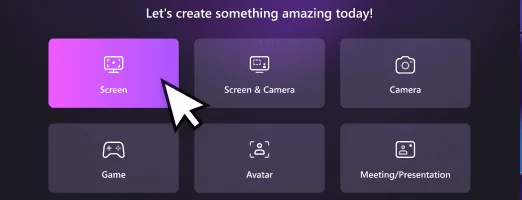
Aura is a free screen recorder for PC for Windows 10 and Windows 11. It records the full screen, a window or a custom region, adds an optional webcam overlay, and captures system audio and microphone on separate tracks. Recordings are saved as MP4 (H.264 video, AAC audio) on your own computer.
What you get when you download Aura
- Screen, window and region capture with the exact pixel size shown before you record.
- Game recording mode for up to 4K at 120 FPS.
- System audio and microphone recorded together, with separate tracks on the timeline.
- Webcam overlay for tutorials and presentations.
- Scheduled recordings that start and stop at a set time.
- Built-in editing timeline with separate screen, camera and microphone tracks.
- No watermark on your recordings.
See it working in the screen recorder for PC demo video on the homepage.
System requirements
| Operating system | Windows 10 or Windows 11 |
|---|---|
| Price | Free, no watermark |
| Output | MP4 (H.264 video, AAC audio) |
| Capture modes | Full screen, window, region, game, webcam |
| Maximum quality | 4K at 120 FPS in game mode |
| Latest release | Version and file size are shown on the download button when the installer is published |
How to install and start recording
- Select Download Aura for Windows and save the installer.
- Open the installer and follow the setup prompts.
- Launch Aura and choose Screen, Game or another mode.
- Pick full screen, a window or a region, and switch on system audio and the microphone.
- Press REC, then stop when you are done. Your MP4 is saved to the folder you chose.
New to recording? Read the complete screen recorder for PC guide for tested settings and a tool comparison, or learn who builds Aura.
Frequently asked questions
Which versions of Windows are supported?
Aura runs on Windows 10 and Windows 11.
Is Aura free, and does it add a watermark?
Yes. Aura is a free screen recorder for PC and does not add a watermark to your recordings.
What video format does the recorder save?
MP4 with H.264 video and AAC audio, which plays on YouTube, Discord and Microsoft Teams without conversion.
Can I record system audio and the microphone together?
Yes. Enable both audio sources before recording and run a five-second test clip to confirm levels.
How much disk space does recording need?
At 1080p60 and 12 Mbps, expect about 90 MB per minute, or roughly 5.4 GB per hour.
Are there built-in alternatives?
Yes. Xbox Game Bar (Win+G) and the Windows 11 Snipping Tool (Win+Shift+R) both record video, though with fewer options.